Feature

Always know where you are in the building

Pin each room of your tour on its floor plan. Visitors see a small map in a corner, with a cone that turns as they look round, and click any room on it to go there.

In short

In Panoramr you upload a floor plan as a picture, click the plan where each 360° photo was taken, and calibrate the radar so its cone points the way the camera faced. Visitors then see the plan as a small map in a corner of the tour, follow where they are and which way they are looking, and click a pin to jump to that room. A tour can have a plan for each floor, and its rooms can be grouped into floors and areas.

Plan files
A PNG or JPEG picture of up to 5 MB
Floors
One plan for each floor; the map follows visitors between them
On a phone
The plan opens from a button in the bottom bar
Plans
Every plan can upload floor plans and pin rooms

Four ways to find your way round

A floor plan with a live map

Upload the plan on the Floor Plans tab and pin each room. The pin of the room a visitor is in carries a radar cone that turns as they look round.

  • Choose the corner it sits in, and whether it starts open or as a small Map button
  • Let visitors drag a corner to make it bigger
  • Add buttons that open the plan in a window, from the top bar or the bottom bar
Add a floor plan

Floors and areas

Give rooms a group, such as Ground Floor, First Floor or Gardens, and switch on the listed navigation. Visitors then pick a floor or an area and go straight to its rooms.

Group your rooms

Where it is on a map

Give each photo its place by typing it, clicking a map, or in one click from the photo’s own GPS, then switch the map on in the top bar. The photo’s own GPS position stays private: only the place you choose is shown.

Set a photo’s location

The best view first

Choose where visitors are looking when each room opens: through the window, at the stage, at the bed.

Set the opening view
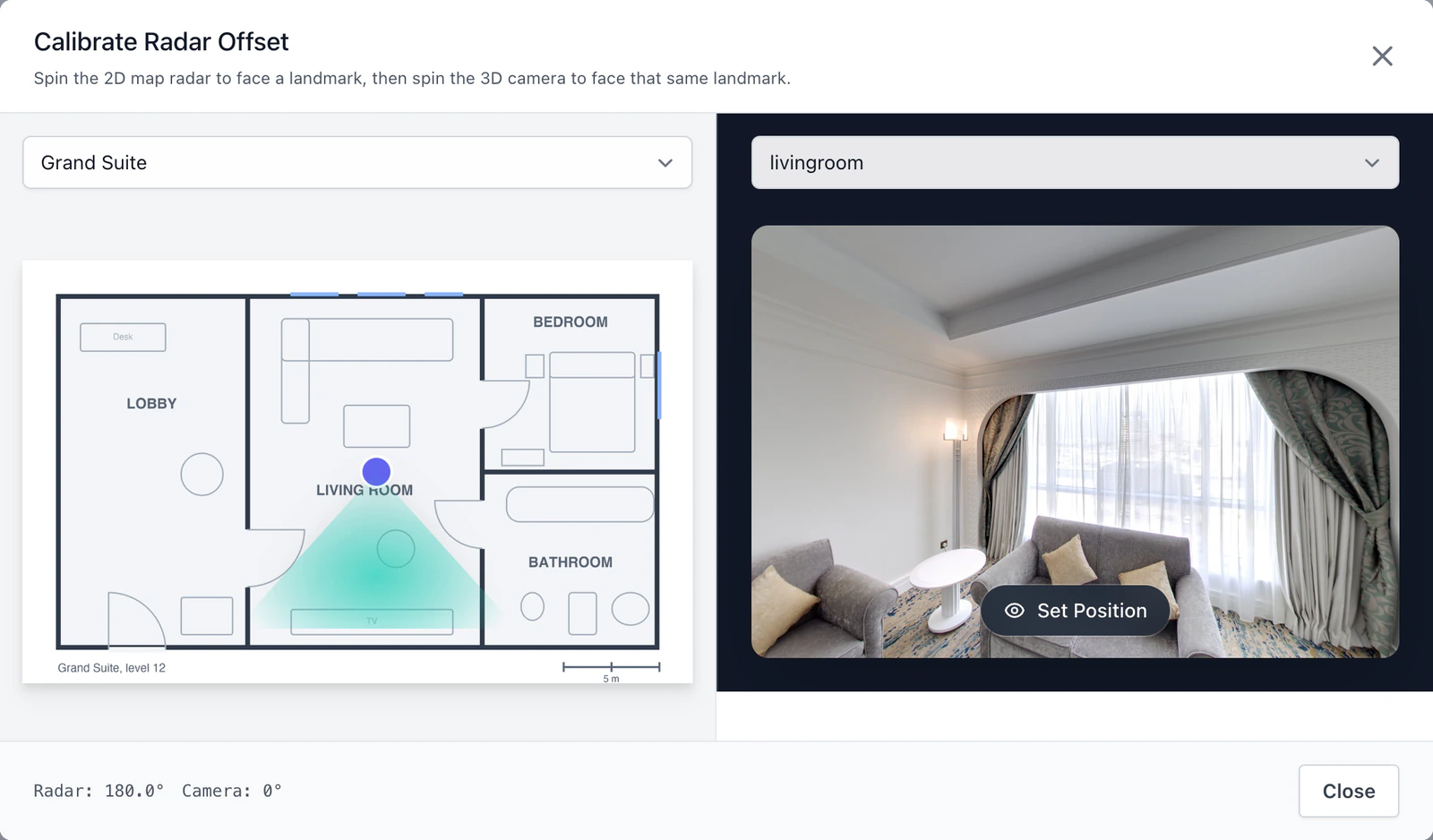
A floor plan in the editor with the rooms pinned on it, and the radar of one pin being calibrated
Calibrating the radar on a demo tour’s floor plan.

Pin the rooms, then point the radar

Click the plan where each photo was taken and choose the room for the pin. Calibrate Radar then turns the cone to match the way the camera faced, so it moves with the visitor’s view.

  • One plan for each floor, switched from a list
  • Pins that take visitors straight to a room
  • A cone that shows which way they are looking

The features behind it

  • Floor plan with a live map

    Upload a floor plan and pin each room on it. Visitors see a small map in a corner, with a cone that shows which way they are looking.

    How it works
  • Floors and areas

    Group the rooms into floors or areas, such as Ground Floor or Gardens, so visitors can go straight to the part they want.

    How it works
  • A map of where it is

    Give each photo its place, from the photo’s own GPS or a click on a map, and show a map in the tour.

    How it works
  • Open on the best view

    Choose where visitors are looking when each room opens: the view from the window, the stage, the bed.

    How it works

See every feature

Questions

What file can the floor plan be?

A PNG or JPEG picture of up to 5 MB, such as an estate agent’s plan or an architect’s drawing saved as a picture. Panoramr does not draw a plan for you or take SVG files.

Can a tour have more than one floor?

Yes, one plan for each floor. Visitors switch between them from a list, and the map follows them to the plan that holds the room they are in.

Does the map work on phones?

On a phone the small corner map is hidden to leave room for the photo, and visitors open the plan from a button in the bottom bar.

Do I need GPS in my photos?

No. You can type a location or click it on a map. When a photo does carry its own GPS position, you can use it in one click, and it is never shown to visitors.

Is the floor plan included on the free plan?

Yes. Every plan can upload floor plans and pin rooms. On a free account, a tour in a Pro theme that has never been hosted shows the map in the free Default look.

Put your plan in the tour

Upload your 360° photos and your floor plan, and pin the rooms. Making the tour is free.

Start creating