How to make a virtual tour from 360° renders
Render 360° panoramas in Blender, V-Ray, Lumion, Twinmotion, Enscape or Unreal and turn them into a walk-through of a building that does not exist yet.
By Ben Kenyon, Founder of PanoramrUpdated 4 min read
In short
Put a 360° (spherical or equirectangular) camera at each spot a visitor should stand, at about eye height and level, and render each view exactly twice as wide as it is tall, such as 8192 × 4096. Save the renders as JPEG or TIFF, then upload them to a tour maker and link the viewpoints, just as you would 360° photos. In Blender, use Cycles with a panoramic camera set to equirectangular. A new design option later only needs the render replaced; the links stay.
Why make a tour from renders
A tour made from 360° renders lets people walk through a building before it is built: a client approving an interior, a planning committee looking at a lobby, a buyer choosing an apartment off plan, or players previewing a game level. The tour works exactly as one made from photos. Each render is a room a visitor can stand in, the viewpoints are linked, and notes can explain each material and finish.
1. Plan the viewpoints
Choose every spot a visitor should stand, as a photographer would on a real site: the entrance, the middle of each room, and the ways between rooms. From each viewpoint the next one should be in sight, so stepping between them feels natural. Write the positions down, or save each as its own camera in the scene, so a later render of a new design option uses exactly the same spots.
2. Set up a 360° camera
- Use the renderer's spherical camera. Most 3D tools have one, called 360°, spherical, panoramic or equirectangular. It records every direction at once, as a 360° camera does.
- About eye height. Around 1.6 metres feels like standing in the room. Use the same height everywhere.
- Level. No tilt and no roll: a tilted camera gives a tilted horizon, which feels far worse in a 360° view than in a still.
- Mono, not stereo. Render a single panorama, not a pair for each eye.
Where to find it
| Tool | Look for |
|---|---|
| Blender | Render with Cycles, then Camera > Lens > Type: Panoramic, Panorama Type: Equirectangular |
| V-Ray, Corona | A camera set to a spherical (360°) projection |
| Lumion, Twinmotion, Enscape, D5 | The 360° panorama output in the render or image settings |
| Unreal Engine | Panoramic rendering, with the output set to equirectangular |
Menu names change between versions; your renderer's own help names the current one.
3. Render at 2:1
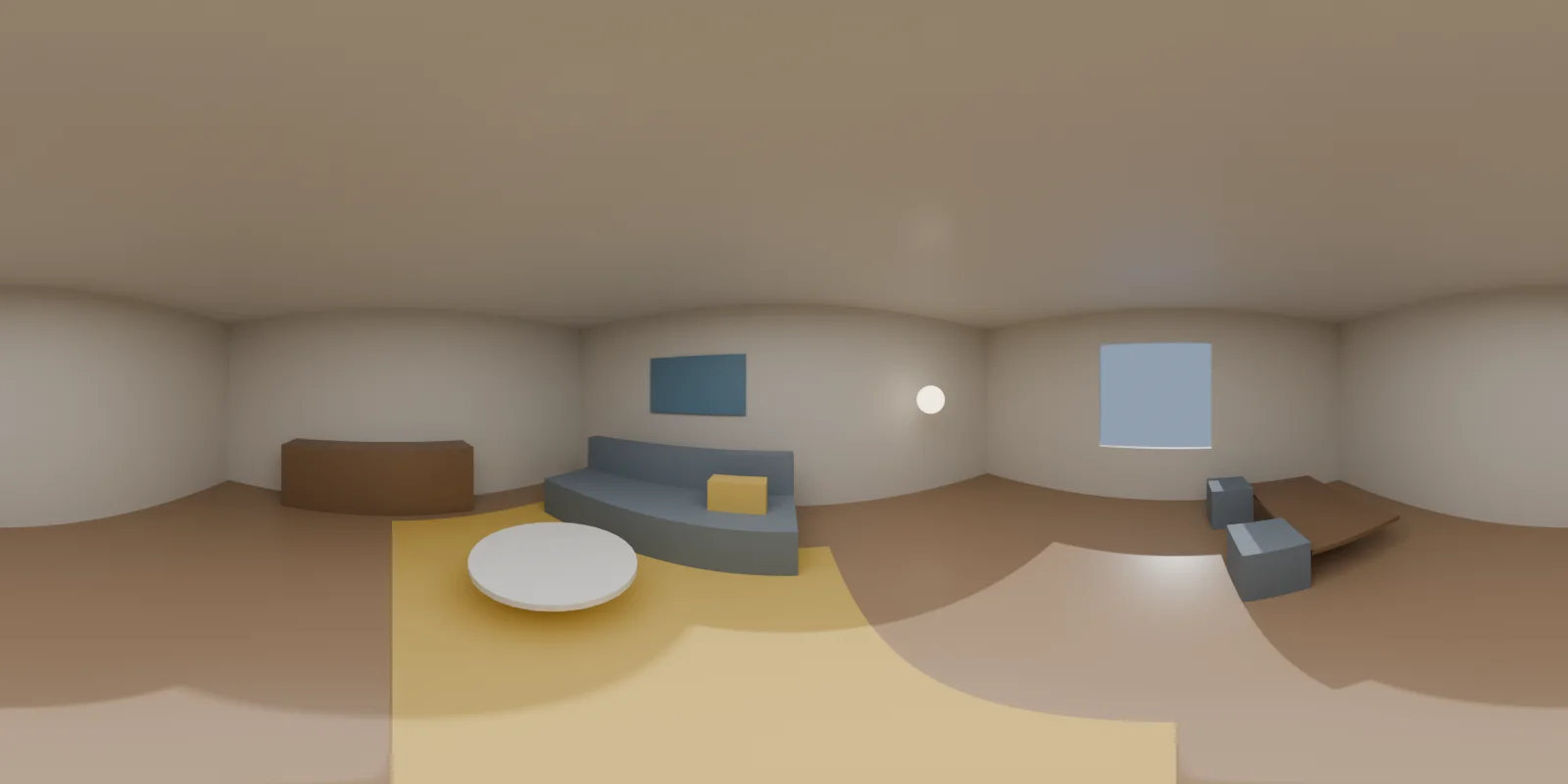
Set the output exactly twice as wide as it is tall: 8192 × 4096 is a good size, and 12000 × 6000 holds up when visitors zoom in. A 360° render spreads its pixels over the whole sphere, so it needs far more of them than a still of the same room: one screen only shows a small part of it. Larger renders take longer, so test the lighting at a small size first.
The result looks stretched in an image viewer, with the floor and ceiling smeared across the bottom and top, like the picture above. That is how a 360° image is stored (what an equirectangular image is).
4. Save as JPEG or TIFF
Export each render as a high-quality JPEG, or a TIFF if you need the extra depth. Panoramr does not take PNG, EXR, HDR or WebP files, so convert those first. A render up to 23,000 × 11,500 pixels can go in from a computer; the photo requirements give every limit, and the free 360° photo checker tests a file's shape and size on your own device.
5. Build the tour
Upload the renders and treat them like photos: link each viewpoint to the next, set the view each room opens on, and add notes with each material, fitting or supplier. How to create a 360° virtual tour goes through the steps, and the 3D renders page shows what studios make with it.
6. Update it when the design changes
A new kitchen finish or a different layout? Render the same viewpoints again with the same cameras and replace each room's picture. In Panoramr the links and notes stay where they were (replace a panorama), so the tour keeps working with the new design.
Questions
Which 3D software can render 360° panoramas?
Most of it: Blender, V-Ray, Corona, Lumion, Twinmotion, Enscape, D5 and Unreal Engine can all render a spherical (equirectangular) panorama. Look for 360°, spherical or panoramic in the camera or render settings.
How do I render a 360° panorama in Blender?
Switch the render engine to Cycles, select the camera, and set Camera > Lens > Type to Panoramic and Panorama Type to Equirectangular. Set the output to exactly twice as wide as it is tall, such as 8192 × 4096, and place the camera at eye height, level.
What resolution should a 360° render be?
At least 8192 × 4096 for a tour that looks sharp on a large screen; 12000 × 6000 if visitors will zoom in on details. Always exactly 2:1.
Can I upload a PNG or EXR render?
Not to Panoramr: export or convert it to a JPEG or TIFF first, at the same size.
Can I make a stereo (3D) virtual tour from renders?
Render a single (mono) panorama. Panoramr shows a flat 360° view, not a stereo pair, also in VR.