What is an equirectangular image? How to view and check one
Why a 360° photo is saved as a stretched rectangle twice as wide as it is tall, how to view one in 360° online, and how to check it will work in a tour.
By Ben Kenyon, Founder of PanoramrUpdated 5 min read
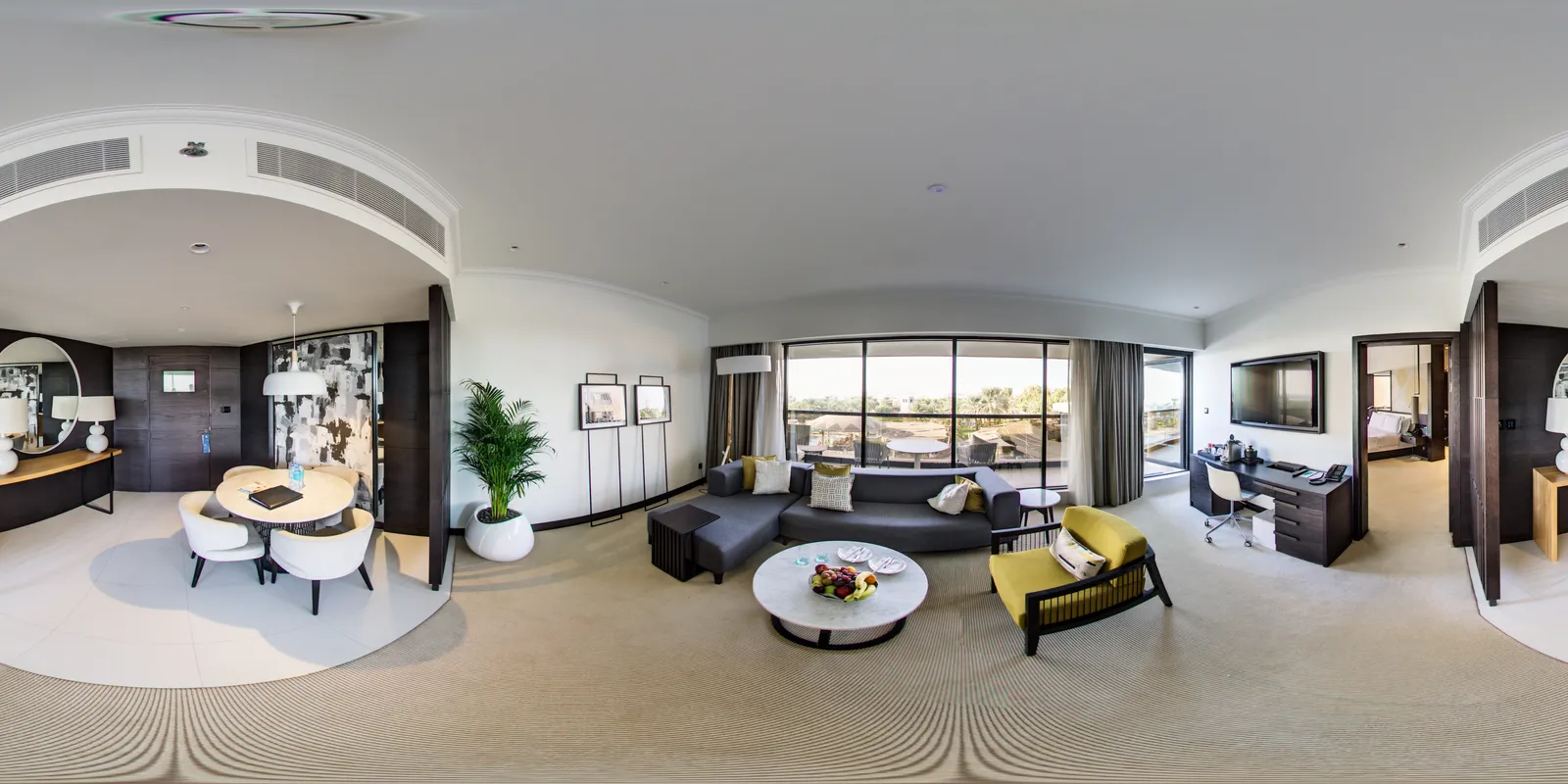
In short
An equirectangular image is the flat file a 360° photo is saved as: the whole sphere around the camera unrolled into a rectangle exactly twice as wide as it is tall, the way a world map unrolls the globe. That is why it looks stretched and bent in an ordinary photo viewer. A 360° viewer wraps it back round you, so the lines look straight again. To work in a virtual tour it must be 2:1, saved as a JPEG or TIFF, and as large as your camera allows.
What an equirectangular image is
A 360° photo shows everything around the camera: all the way round, straight up and straight down. That is a sphere, and a sphere cannot be saved flat without stretching it somewhere. An equirectangular image is the usual way to do it. Every point on the sphere has two angles: how far round (0° to 360°) and how far up or down (from straight up to straight down, 180°). The image uses the first as its width and the second as its height. So the file is always twice as wide as it is tall, a 2:1 shape, because 360 is twice 180.
It is the same trick as a world map that unrolls the globe into a rectangle, where the North and South Poles become the whole top and bottom edges. In a 360° photo, the ceiling and the floor are spread across those edges in the same way.
Why it looks stretched and bent
Open one in an ordinary photo viewer and it looks wrong: straight walls curve, the ceiling light becomes a wide smear along the top, and the tripod becomes a band along the bottom. Nothing is broken. A single point straight above the camera has to fill the entire top row of pixels, so the nearer something is to straight up or straight down, the more it is stretched sideways. The middle row, the horizon, is the only part shown without stretching.
A 360° viewer does the reverse: it wraps the rectangle back onto a sphere and shows you a small window of it, as a normal camera would. The walls are straight again, and you drag to look round. That is what a virtual tour does with each of its photos.
How to view an equirectangular image in 360°
- Online, without uploading it: drop the file into the free 360° photo checker. It shows the photo in a 360° viewer you can drag round, and it reads the file in your own browser: the photo is never sent anywhere.
- In the camera maker’s app: Insta360, RICOH and other makers show their own photos in 360° in their phone and desktop apps.
- In a tour: upload it to a tour maker. How to create a 360° virtual tour goes through the steps.
An ordinary photo viewer, or a picture placed on a web page, shows the flat rectangle: that is expected, not a fault in the file.
The sizes you will meet
Because the shape is fixed, a 360° photo is described by its width. 8192 × 4096 is a common size; an Insta360 X4 or X5 makes 11904 × 5952, and the Insta360 X6 makes photos 15,520 pixels wide. A tour looks soft when a visitor zooms in under about 4,000 pixels wide, because one screen only shows a small part of the sphere. Nine 360° cameras compared lists what each camera makes.
Other ways to store a 360° photo
- Two fisheye circles: what a two-lens camera records before its app joins the pictures. A tour cannot use this file until it is exported as an equirectangular image (how a 360° camera sees a room).
- Cube faces: six square pictures, one for each side of a cube around the camera. Some stitching programs export them, and a tour can take them as well.
- A little planet: an equirectangular photo bent into a small round world. It is a picture to look at, not a file to build a tour from (how to make one). Panoramr can also play one as a tour’s opening (the little planet intro).
- A phone panorama: a wide strip that does not include what is above and below you, and is far more than twice as wide as it is tall. It is not a 360° photo, and it will not fill a sphere.
How to check one works in a virtual tour
- It is 2:1. The width is twice the height. Panoramr also takes a photo slightly off that shape (width divided by height between 1.9 and 2.1) and fits it to the sphere; anything further off is refused.
- It is a JPEG or a TIFF. Export a JPEG at the highest quality your app offers unless you need TIFF for retouching.
- It is a sensible size. A file of 250 MB MB or less uploads quickest; the photo requirements give every limit.
- It looks right in 360°. The horizon is level, nothing is broken on the stitch line, and the tripod is the only thing you would not want a visitor to see (how to hide it).
The 360° photo checker tests the first three for you and lets you look round the photo for the fourth.
Questions
What does equirectangular mean?
It names the way the sphere is flattened: the angle round the camera becomes the image’s width and the angle up or down becomes its height, in equal steps. The result is a rectangle twice as wide as it is tall.
Why is my 360° photo distorted?
You are seeing the flat file. The top and bottom of an equirectangular image are stretched because a single point straight up or down fills a whole row of pixels. Open it in a 360° viewer, such as the free photo checker, and the lines look straight.
How do I view an equirectangular image online?
Drop it into a 360° viewer such as Panoramr’s free 360° photo checker. It shows the photo in 360° and never uploads it.
Is an equirectangular image the same as a 360° photo?
It is the usual file a 360° photo is saved as. The same photo can also be stored as two fisheye circles straight from the camera, or as six cube faces, but a virtual tour normally takes the equirectangular file.
What size should an equirectangular image be for a virtual tour?
As large as your camera makes it, and exactly twice as wide as it is tall. Under about 4,000 pixels wide it looks soft when visitors zoom in; most 360° cameras export 6,000 pixels or more.