How to view a 360° virtual tour in VR, on a headset or a phone
What you need to walk through a 360° virtual tour in VR, on a headset such as a Meta Quest or a phone in a viewer, and how to make a tour that works well in it.
By Ben Kenyon, Founder of PanoramrUpdated 4 min read
In short
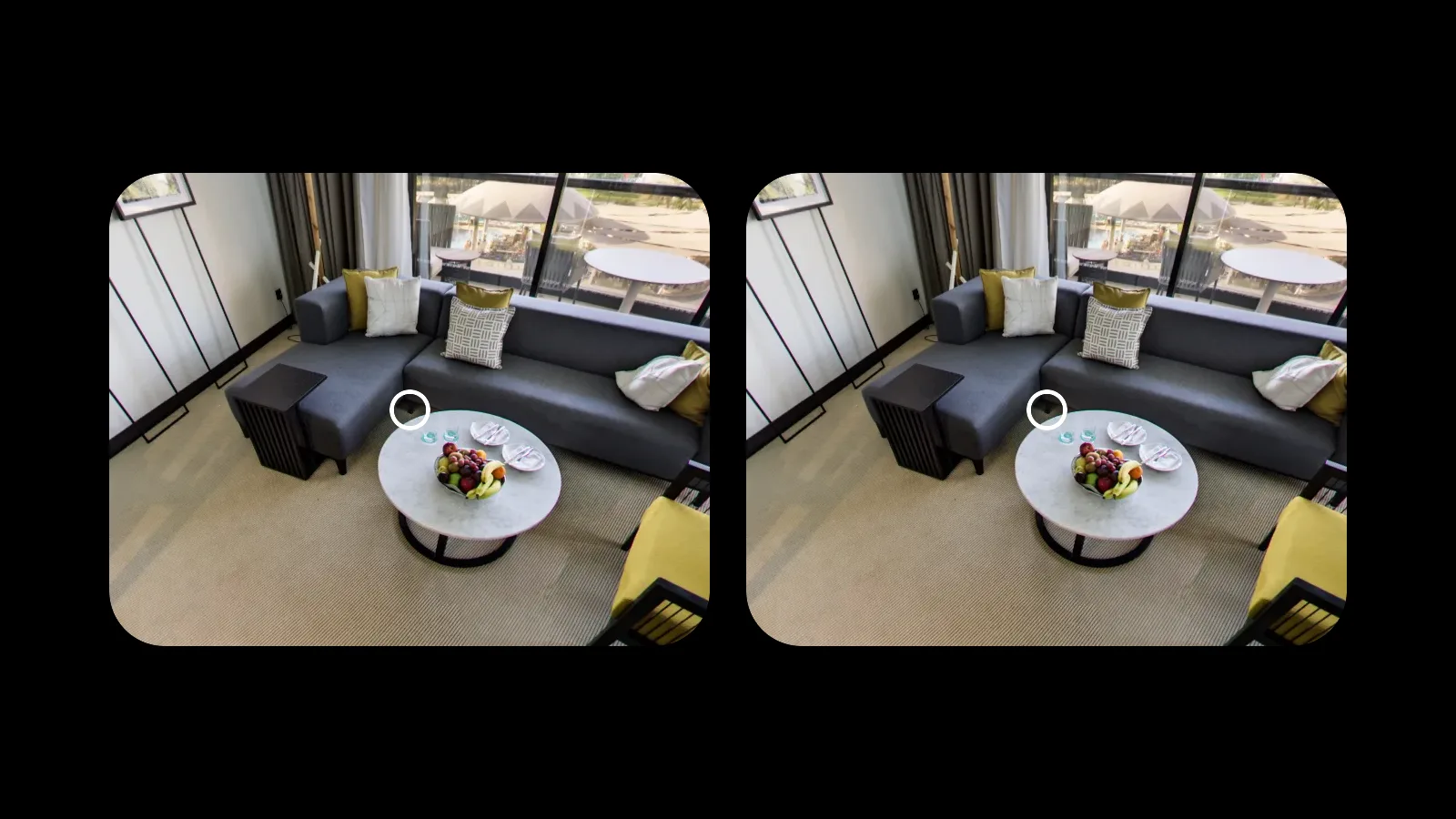
To see a 360° virtual tour in VR, open its link in the web browser of a VR headset, such as a Meta Quest, and press the tour's VR button: the tour fills the headset and you look round by turning your head. On a phone, the same button shows the room twice, side by side, for a Cardboard-style viewer. In Panoramr's tours you move by looking at a link circle for a moment. To make a tour that works well in VR, link every room, keep the photos level and sharp, and switch the VR button on.
What you need
There are two ways to see a tour in VR, and neither needs an app:
- A VR headset with a web browser, such as a Meta Quest. Its browser can start a full VR session: the tour fills the headset and follows your head.
- A phone in a viewer, a Cardboard-style headset that holds a phone in front of two lenses. Google stopped selling its own Cardboard in 2021, but other makers still sell viewers like it, often for a few pounds. The tour shows the room twice, once for each eye.
You can also look round any 360° tour without VR: drag it on a computer, or turn your phone where the tour follows its movement.
On a VR headset
- Open the tour's link in the headset's web browser. Type it, or send it to yourself and open it there.
- Press the VR button. It is a goggles icon in the tour's bar, or a button reading
Enter VRat the bottom of the page. - Look round by turning your head. The room opens facing the way you were looking when you pressed the button.
Leave VR the way your headset leaves any VR view; the tour is still there behind it.
On a phone in a viewer
- Open the tour's link on the phone, turn the phone sideways and press the VR button.
- Put the phone into the viewer, screen towards the lenses. You see one room, in depth.
- Look round by turning your head. If the view stays still, the phone's browser is not sending its movement to the page; take the phone out and drag with a finger instead. Press
✕ Exit VR, top right, to leave.
Moving round a tour in VR
In a Panoramr tour, VR is controlled by where you look, so you need no controller:
- Each link to another room is a cyan circle. A thin white ring marks the middle of your view: hold it on a circle for a second and a half to go to that room.
◀ PREVandNEXT ▶sit below the point you faced when the room opened, for the tour's rooms in order.- Only the rooms and their links are in VR. Text, pictures, video, the floor plan and the menus wait for you outside VR. Sound that was already playing keeps playing, and turns with your head.
Other tour makers use other controls, such as a headset's hand controllers: look for the tour's own help.
Make a tour that works well in VR
- Switch the VR button on. In Panoramr it is off until you add it, in the Design tab (the VR button).
- Link every room both ways. In VR, links are the only way round, so a room with no link out is a dead end.
- Keep the photos level and sharp. A tilted horizon feels much worse inside a headset than on a screen, and a soft photo looks softer when it fills your view (how to take the photos).
- Put what matters in the rooms, not only in text. Notes and pictures are left out of VR, so a visitor in a headset sees only the rooms.
- On your own website, use the latest embed code. It includes the permission a headset's browser needs to start VR inside the frame (embed problems).
Questions
Can I view a 360° virtual tour on a Meta Quest?
Yes. Open the tour's link in the Quest's web browser and press the tour's VR button; the tour then fills the headset and follows your head.
Do I need an app to see a virtual tour in VR?
No. A tour made for the web opens in the headset's or the phone's browser. Press the tour's VR button there.
Can I use Google Cardboard for a virtual tour?
Yes, or any Cardboard-style viewer. Open the tour on your phone, press the VR button to show the room side by side, and put the phone in the viewer.
Why is there no VR button in the tour?
The tour's maker has not switched one on. In Panoramr it is off until the owner adds it in the Design tab. A headset that can start VR may still show an Enter VR button at the bottom of the page.
How do I move between rooms in VR?
In a Panoramr tour, look at a cyan link circle and hold the white ring in the middle of your view on it for a second and a half.