How to make a virtual tour of a school or university
An open day that never closes: how a school, college or university plans, photographs and organises a 360° campus tour that applicants actually use.
By Ben Kenyon, Founder of PanoramrUpdated 4 min read
In short
Follow your open-day route and take a 360° photo at each place a visitor would stop: reception, classrooms, labs, the library, sports facilities, dining and every type of accommodation. Photograph rooms empty of pupils or with written permission. Group the rooms by building, add a campus map whose buildings open their room lists, and add a welcome video and short notes. Translate it for international applicants, put it on your admissions pages, and replace photos after building work.
An open day that never closes
An open day happens once or twice a year, and many families cannot come. A 360° campus tour lets them walk the classrooms, labs, sports facilities and halls whenever they like, from anywhere in the world, and then book the visit. Universities use the same tour for international applicants who will not see the campus before they arrive, for students choosing between halls, and for clubs and companies hiring a sports hall or a theatre.
Plan it from your open-day route
Start from the route your guides walk on an open day, and the questions families ask on it. A typical list:
- The main entrance and reception.
- A typical classroom and a lecture theatre.
- Science labs, art, music and drama rooms.
- The library and study spaces.
- The sports hall, pitches and pool.
- The dining hall and social spaces.
- Each type of accommodation, and its kitchen.
- Support services: careers, wellbeing and the medical room.
- The grounds, and the way in from the station or the car park.
A school usually needs 20 to 50 photos; a university campus 60 or more. Take one at each spot a visitor would stop, each in sight of the next, so linking them feels like walking.
Photograph it safely and with permission
- Photograph rooms empty of pupils, in the holidays, at a weekend or after the day ends. Where people appear, have their written permission, and follow your own safeguarding policy.
- Tidy up as for an open day: clear the desks and the boards, and remove anything personal or confidential from the walls, especially names and photos of pupils.
- Keep the camera at the same height in every room, level, on a tripod, and turn every light on.
How to take 360° photos for a virtual tour has the rest of the habits. If your school asks how a tour company handles pupils' data and photos, Panoramr's answer is in our DPA and safeguarding questions.
Organise it by building
A campus tour has many rooms in several buildings, so how visitors find a room matters as much as the photos:
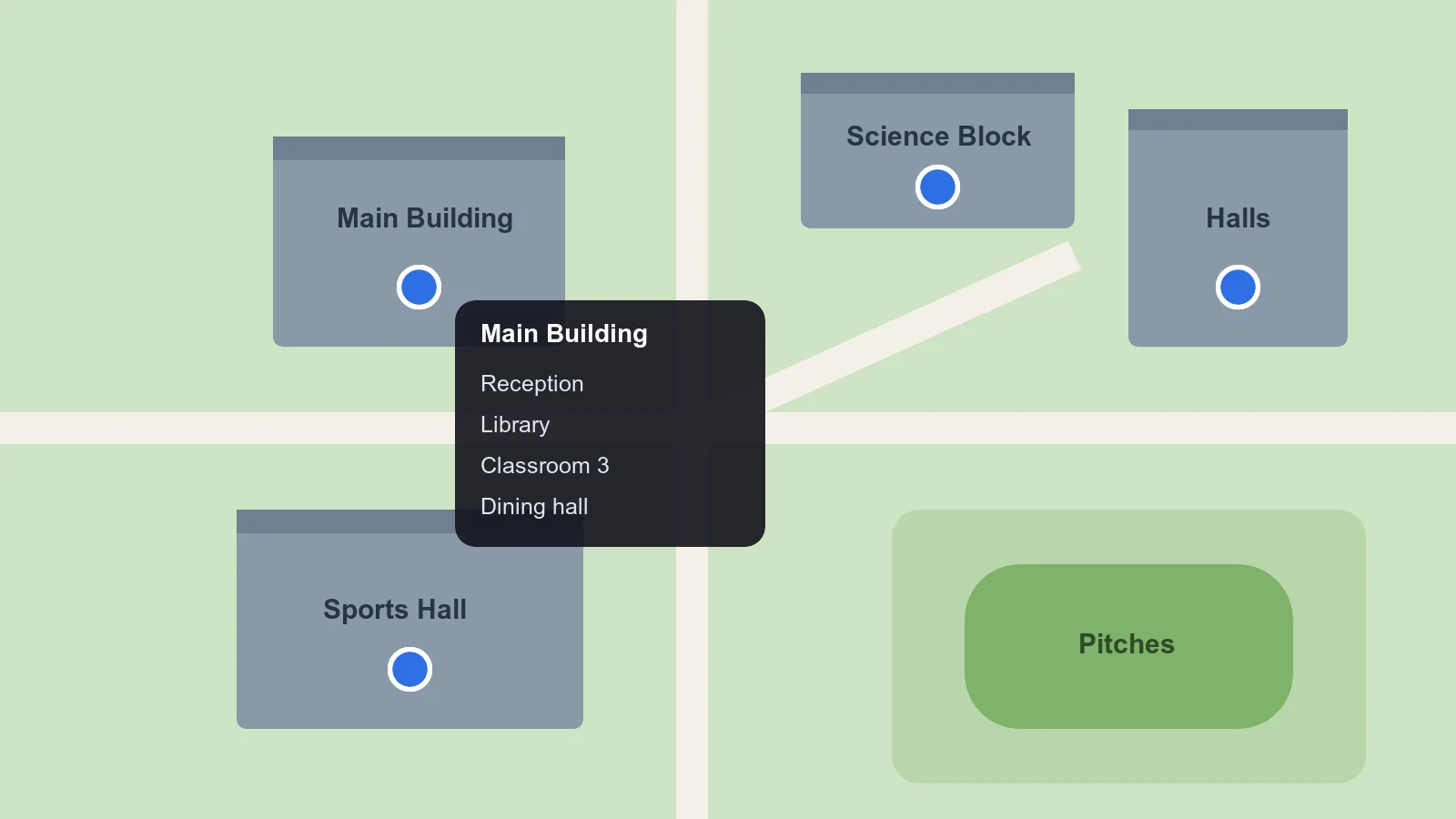
- A group for each building or area, such as Main Building, Science Block and Halls, with groups inside groups for floors or departments where it helps (panorama groups).
- A campus map: a picture of the whole site, a drawn map, a plan from your prospectus or an aerial photo, with an area over each building. Clicking a building opens the list of its rooms, as in the picture above.
- A side menu that lists the same buildings, each opening its rooms, for visitors who prefer a list.
Make a campus tour goes through all three in Panoramr, step by step.
Add what helps people choose
- A short welcome from the head or a student, as a video in the first room.
- A note in each room on what happens there: the subjects taught, the equipment, the opening hours of the library.
- Accommodation side by side: every room type and its kitchen, with the price band and what is included.
- Accessibility: step-free routes, lifts and accessible rooms noted where they are. Panoramr tours also have a plain text version for screen readers, and a switch that adds an icon to open it.
Reach international applicants
Applicants overseas are the people a campus tour helps most. Translate the tour's room names, notes and building names into the languages they speak, and link each language from the matching page of your website (a tour in several languages).
Put it where applicants look
- Embed it on your admissions and open-day pages, near the button that books a visit (embedding a tour).
- Send it in your open-day emails to those who registered and could not come.
- Open on the right room: link the accommodation page to the halls and the sport page to the sports hall, rather than to the front door.
Keep it current each year
After building work or a refit, photograph that room again and replace its photo: in Panoramr the notes and links stay where they were. A tour that shows last year's library is worse than none, so check it before each open-day season.
Questions
How many 360° photos does a school virtual tour need?
A school usually needs 20 to 50, and a university campus 60 or more: one at each place a visitor would stop on your open-day route.
Can we photograph classrooms with pupils in them?
Only with written permission and within your safeguarding policy. Most schools photograph rooms empty, in the holidays or after the day ends.
How do visitors find a room on a large campus?
Group the rooms by building and add a campus map: in Panoramr, clicking a building on the map opens its list of rooms, and a side menu lists the same buildings.
Can the tour be in other languages for international students?
Yes. Translate the room names, notes and building names, and link each language from the matching page of your website.
Can we update the tour each year?
Yes. Replace a room's photo after building work; in Panoramr its notes and links stay where they were.