How to make a virtual site tour for inductions and safety training
Use a 360° virtual tour of a factory, warehouse or site so new starters and contractors learn the way round, the exits and the PPE zones before day one.
By Ben Kenyon, Founder of PanoramrUpdated 5 min read
In short
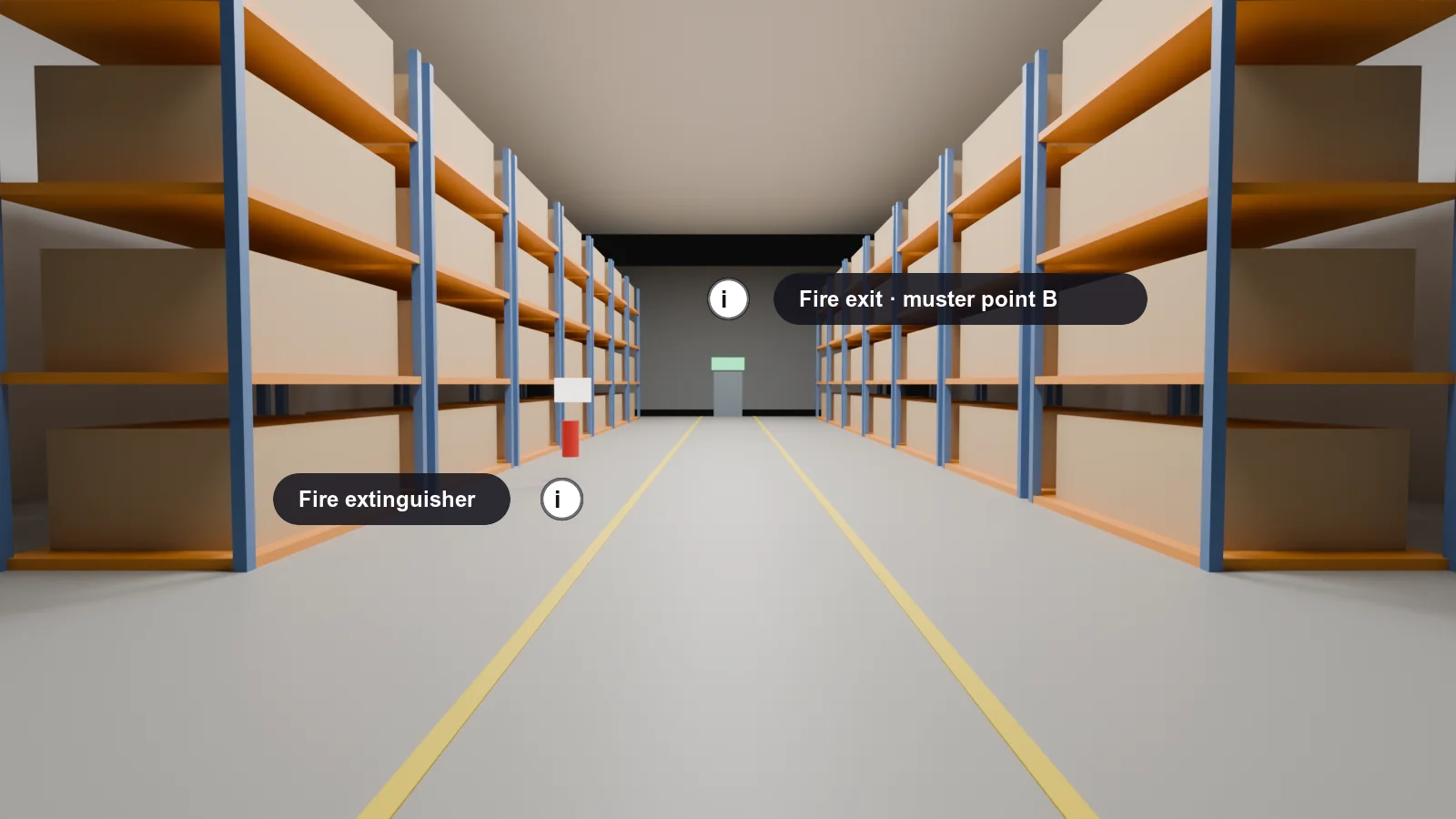
A virtual induction tour links 360° photos of each area of a site, with a note in each on the hazards, the PPE it needs, the fire exits and who to ask. Agree with your safety and security teams what can be shown, photograph the route a new starter walks, from the gate to the muster point, and add a site plan. Share it privately by link or password, send it before day one, and keep it current when the layout changes. It prepares people for the site induction; it does not replace it.
What a virtual induction tour does
The first day on a busy site is a lot to take in: the way from the gate, where to sign in, which walkways to keep to, where the fire exits and the muster point are, what to wear in each area and who to ask. A 360° tour of the site lets new starters, agency staff, contractors and visitors see all of it before they arrive, at their own pace, as often as they like. On the day, the site induction can spend its time on the things only a person can teach.
It also helps afterwards: a refresher before a shutdown or an audit, a way to show a contractor where they will work, and a look round for people who cannot easily walk the floor, such as office staff, auditors or customers.
It prepares people; it does not replace the induction. Your site induction, its sign-off and supervision stay as your safety rules require. The tour makes them easier.
Agree what can be shown
Before anyone takes a photo, agree with your safety, security and site managers:
- Which areas are in, and which stay out, such as confidential processes, a customer's products or a lab.
- What must not be legible: screens, whiteboards, paperwork and drawings.
- People: shoot at a quiet time, ask before anyone is photographed, and keep faces out where you can.
- Who sees the tour: an induction tour is usually shared privately, not published to the world (see below).
Plan the route
Follow the way a new starter walks, in order: the gate, the car park and the pedestrian route, reception and sign-in, the locker and rest areas, then each production or storage area along its walkways, the loading bays, the first-aid point, every fire exit and the assembly point. Take one 360° photo at each place a person would stop, and make sure each spot can see the next, so linking them feels like walking. Most sites need between 15 and 50 photos.
Take the photos safely
- Shoot under the site's own rules: sign in, wear the PPE the area needs, and have someone from the site with you in working areas.
- Pick a quiet time. Moving vehicles and people make for blurred photos and a risky shoot; a break, a changeover or a weekend is easier.
- Put the camera at eye height on a tripod, level, on the walkway where people actually walk, so the tour shows the view they will see.
- Use HDR where a bright doorway or skylight meets a dark aisle.
How to take 360° photos for a virtual tour has the rest.
Add the safety information
The photos show the way round; the notes make it an induction:
- A note in each area with what happens there, its hazards, the PPE it needs and who to ask. Keep each note short and use the same order everywhere, so people know where to look.
- Fire exits, extinguishers, first aid and the assembly point marked where they are in the photo, not only listed.
- A site plan with each photo pinned on it, so people see where they are and which way they face (floor plans).
- A video of a machine running, or of the right way to cross a loading bay, where a still photo cannot show it.
- The rooms in groups, such as by building or by floor, so a large site stays easy to find your way round.
Panoramr's notes, videos and other hotspot types are described in hotspot types.
Share it safely
An induction tour is for your people, not for search engines:
- Keep it private. Every new tour in Panoramr starts private. Once it is hosted, it can open only to people with its link, or only to people who know its password, and stay off Explore (who can open a tour).
- Send it before day one, with the joining instructions, and ask people to look round before they arrive.
- Have it at reception on a tablet or a screen, for visitors and contractors signing in.
The same photos can make a separate, public tour for recruitment, without the safety notes and the areas you keep private.
Keep it current
A tour that shows an old layout is worse than none. When a walkway, an exit or an area changes, photograph that spot again and replace its photo: in Panoramr the notes and links stay where they were. Put a review date in the safety team's calendar, as you would for any induction material.
Questions
Can a virtual tour replace a site induction?
No. It prepares people for it: they arrive knowing the way round, the exits and the PPE zones, so the induction can focus on what needs a person. Your induction, its sign-off and supervision stay as your safety rules require.
How do we keep an induction tour private?
Share it only with the people who need it. In Panoramr a new tour is private; once hosted, it can open only to people with its link or its password, and it stays off Explore.
What should a virtual induction tour include?
The route from the gate to each work area, the walkways, every fire exit and the assembly point, first aid, the welfare areas, and a note in each area on its hazards, the PPE it needs and who to ask, with a site plan.
How many 360° photos does a site tour need?
Most sites need between 15 and 50: one at each place a person would stop on the route, each in sight of the next.
Can we show a machine running in the tour?
Yes. Add a video of it, played in a window from a note or on a flat surface inside the photo.