Tour analytics: what Panoramr counts and what it does not
Where to see views, rooms and countries for a tour, what counts as a view, what is not recorded, and why there is no Google Analytics connection.
Reference5 min read Updated
On this page
The short answer
Panoramr counts unique views of each tour. To see how many people have viewed a tour, open its Analytics tab (in the Advanced view); for all your tours together, open Global Analytics. A visitor counts once an hour for each tour, and programs such as search bots do not count. A tour has no Google Analytics setting.
Where to look
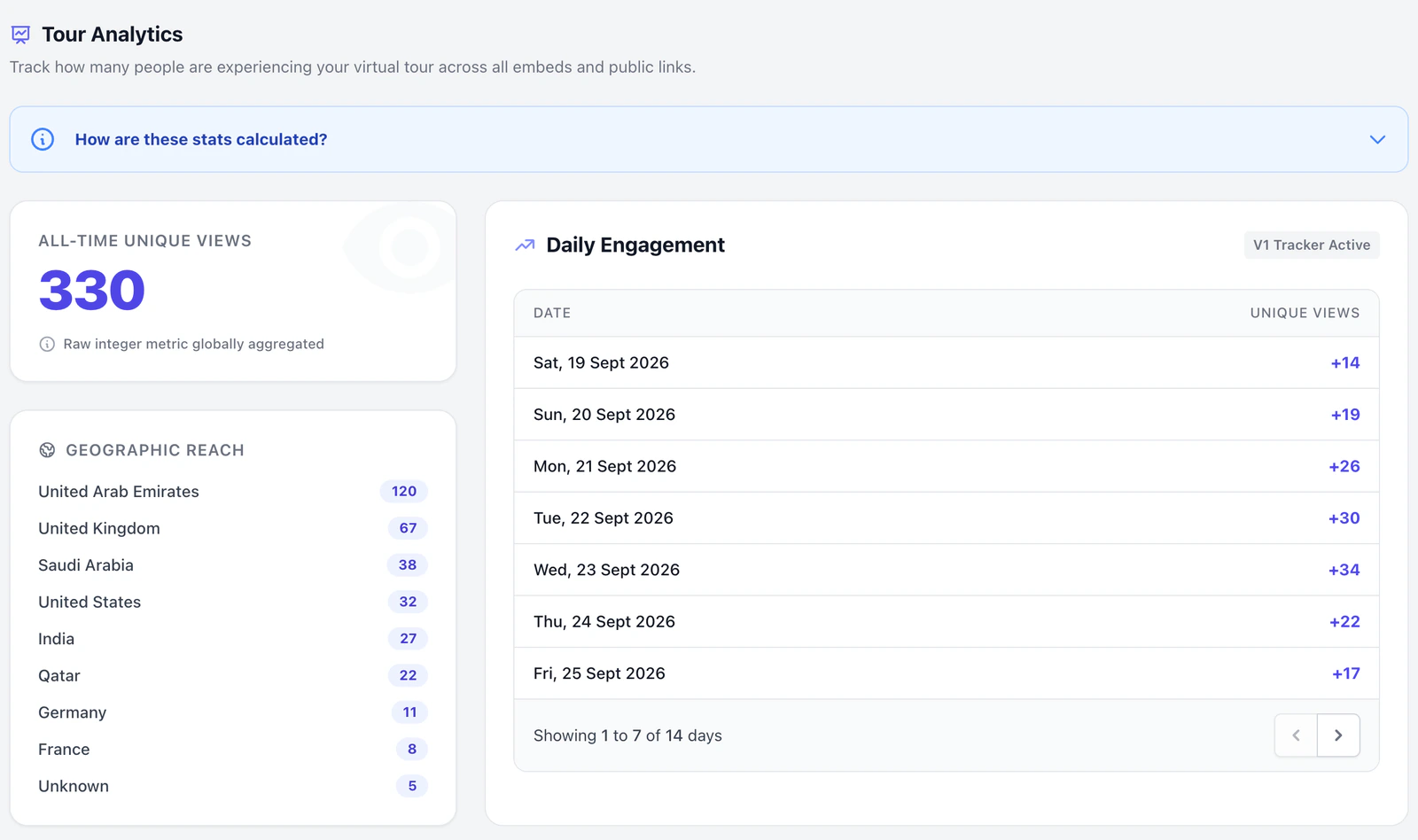
- One tour. Open the tour and click the Analytics tab (click Advanced at the right end of the tab row first if the tab is not there). The page is called Tour Analytics. It has four parts: All-Time Unique Views, Geographic Reach, Daily Engagement and Top Performing Rooms. The box How are these stats calculated? opens a short explanation.
- All your tours. Open the avatar menu and click Global Analytics, or click it in the My Account menu. Total Platform Views adds up all your tours. Top Performing Tours lists the ten tours with the most views, drafts included; click a name to open that tour's Analytics tab.
The same total appears in the Views column of My Tours and beside the eye icon on a tour's Explore page.
Who sees it: the owner, and collaborators whose role includes the Analytics tab. All three roles do by default, and the owner can change that under Client Workspaces in My Account. On the free trial the Analytics tab is greyed out (Analytics is not available on the trial. Create a free account to use it.). Global Analytics covers only the tours you own.
What counts as a view
A visit counts when a visitor opens one of these:
- the tour's player on its own, which is also what an embed loads;
- the tour's Explore page;
- the tour's page on the social site, unless the owner opens it.
Each visit is counted once an hour for each visitor and tour. A visitor is an IP address together with a browser's identification, so two people on one network with the same browser can count as one. The Explore page and the player inside it count as one visit.
The box How are these stats calculated? says people on one network are always counted separately. The count uses only the IP address and the browser's identification, as described here.
These do not count:
- visits from programs: search bots, link previews, monitors, scripts such as curl, and anything that sends no browser identification;
- anything opened from the editor's Preview tab or the Design page;
- a second visit from the same visitor within the hour.
Your own visits to the Explore page or the player address count like anyone else's.
Countries
Geographic Reach lists countries, most views first. A country is recorded only when the visit is to the Explore page or the social-site page. It comes from a lookup of the visitor's IP address, and a lookup that fails is filed under Unknown. A tour that is only seen through an embed or the player address shows No geographic data collected yet.
Days
Daily Engagement shows one row for each day that had a view, with the number of new unique views, seven days a page. The list starts with the oldest day, so use the arrows to reach recent days. A day runs from midnight to midnight UTC. The date on each row is shown in your browser's time zone, so west of UTC it can read one day earlier. A new tour shows No daily data recorded yet.
Rooms
Top Performing Rooms lists the panoramas of the tour, most views first, with Panorama Image, Group Selection and Total Views. Click a row to open that panorama in the Panoramrs tab.
- A room view is recorded each time the player shows that room, the first one included. The same browser counts once an hour for each room.
- The total belongs to the panorama, so a panorama used in two tours shows the same number in both.
- Browsing the tour in the Preview tab adds room views.
- Room views are not filtered for programs.
What is not recorded
The analytics keep only a count of views for each day, the countries of some of those views, and a total for each room. They hold no record of time spent, hotspot clicks, devices, browsers or where visitors came from.
Google Analytics
There is no field for a Google Analytics (GA4) Measurement ID, and the tour player loads no Google Analytics code. The Analytics tab is the only place Panoramr shows you a tour's visits. Anything you run on a website that holds an embed is separate from Panoramr, which has no setting to connect to it.
Troubleshooting
My number is lower than my website's, or another tool's. Panoramr counts a visitor once an hour, ignores programs and ignores the Preview tab. Another tool may count in its own way.
My own visit did not add a view. An hour has not passed since your last visit, or you opened the tour from the Preview tab.
Geographic Reach shows nothing, or only Unknown. Countries come only from the Explore page and the social-site page, and Unknown is a lookup that failed.
A room I never opened has views. Its panorama is shared with another tour, or was browsed in the Preview tab.
The daily list shows old dates. It is sorted oldest first. Use the arrows at its foot.
Next steps
Was this article helpful?