Download a tour as a ZIP and host it on your own server
Download a tour from the Publish tab as a ZIP, see what is in it, host it yourself, and fix the black screen you get when you double-click index.html.
Guide7 min read Updated
On this page
The short answer
The Publish tab's Download pane gives you a ZIP of your tour as a small website: a page, the player's files and your scenes' pictures. You put it on a web server to show it. Opening index.html by double-clicking it is likely to show a black screen, and the page still asks Google over the internet for a font, and a map window asks OpenFreeMap for the map's pictures.
Who can download, and which design you get
- The owner, and by default an Admin collaborator, who can open the Publish tab. Every plan can download.
- The free download is the Standard design: Panoramr's standard look, without the settings of your Design tab. On a Free plan it includes the Panoramr splash, logo and nadir (the round Panoramr logo on the floor), and so does the ZIP of a tour that is in a Vault: a Vault is hosting, not a download.
- Your own design needs a paid plan (Pro, Agency or Enterprise). The window calls this Pro. On a paid plan the ZIP of a tour that is hosted without Panoramr's branding, in your plan's hosting or in a Vault, has no Panoramr splash or nadir, in either design; the ZIP of a tour that is not hosted keeps them. Building and previewing your design is free on every plan.
- How many scenes. The ZIP holds all of the tour's scenes, unless the tour is in a Vault that holds fewer: then the first scenes that fit, and
README.txtsays so. Plans, prices and limits has the rest.
Download the ZIP
- If you changed your design, click Save & Render on the Design tab first. The ZIP holds what is saved in the editor now, not the version visitors have when Draft Workflows is on.
- Open the tour, click the Publish tab, then Download in the list of panes.
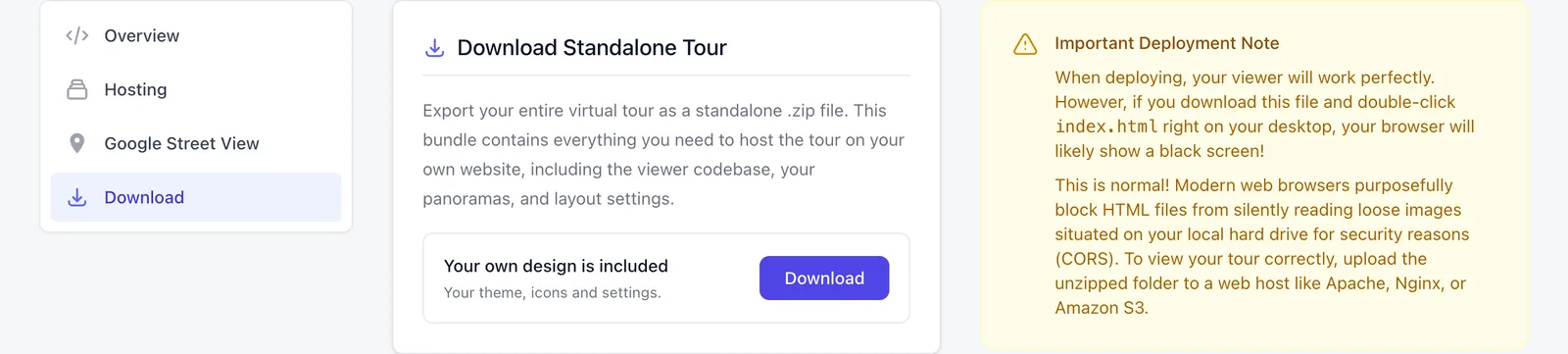
- In the card Download Standalone Tour, click Download. A window called Download your tour opens.
- Click Download free theme, or Download my design when it is available.
- The browser saves a file named after the tour, such as
my-tour.zip. The pane saysYour download is starting. A large tour can take a moment before the file begins to arrive.
If Download my design is gray, the window says Needs a Pro, Agency or Enterprise plan. and offers Buy a Pro plan. On a tour that is in a Vault that runs it adds A Vault hosts this tour; it does not include the download.
What is in the ZIP
| In the ZIP | What it is |
|---|---|
index.html and data.js |
The page, and the tour's data: scenes, hotspots, floor plans and settings |
engine.js, vendor/, plugins/, components/, img/ and the theme's files |
The player |
panoramas/<number>/ |
One folder for each scene, named by the panorama's number, with its image tiles and preview |
floorplans/, media/ and logo files |
The floor plan pictures, and the pictures, sounds and videos your hotspots use from Panoramr's storage |
README.txt |
Only when something could not be included |
Everything sits at the top level of the ZIP. It holds what visitors are shown, not the private original of each photo.
Put it on a server
- Unzip the file into a new folder.
index.htmlis at the top of it. - Upload the whole folder, with its structure, to a web host that serves files. The Download pane names Apache, Nginx and Amazon S3 as examples.
- Open the address of
index.htmlin a browser.
The ZIP is a snapshot. After you change the tour, download it again and upload the new files.
Why a double-click shows a black screen
The yellow box Important Deployment Note on the Download pane warns that your browser will likely show a black screen when you double-click index.html. It explains that browsers do not let a page opened from a file read the image files beside it. To look at the tour on your own computer, serve the folder with a web server. We do not give steps for one.
What a downloaded tour does not do
- It is not fully standalone.
index.htmllinks to Google Fonts, a map window loads its pictures from OpenFreeMap (OpenStreetMap on a device that cannot draw that map), and a video hotspot loads YouTube or Vimeo. The map libraries are in the ZIP, and a downloaded tour always shows the free map. We have not tested the tour with no connection at all. - The language switcher and the accessibility view do not change anything. Their buttons reload the page with
?lang=or?accessibility=truein the address. Only Panoramr's server acts on those. - Panoramr does not count its views. See Tour analytics.
Limits
You can download the same tour four times a minute and 30 times an hour. The server also limits how many ZIPs it builds at the same moment.
Troubleshooting
The tour is a black screen. If you opened index.html by double-clicking it, the pane's warning applies: put the files on a web server and open the server's address.
The tab shows 429 and Too Many Requests. You passed four downloads in a minute or 30 in an hour for this tour. Wait, then go back and download once. After the hourly limit the wait can be longer.
The tab shows 503 and Service Unavailable. Several tours are being downloaded at the same moment. Wait a minute and try again.
The tab shows 403 and Downloading your own design is part of the Pro, Agency and Enterprise plans. A Vault is hosting and does not include it. The tour's owner is not on a paid plan, or the plan ended while the page was open: reload the page and use Download free theme, or buy a Pro plan.
The ZIP will not open, or the download stopped early. The connection broke, or a file could not be read while the ZIP was being written. Download it again.
Scenes are missing. Open README.txt in the ZIP. It starts with This export is not complete. and lists what is missing:
| A line in README.txt | Cause and fix |
|---|---|
This tour has N panoramas, but its plan publishes M, so only the first K are in this export. |
The tour's hosting holds fewer scenes than the tour has. Move the scenes you want to the top of the tour, or make the Vault bigger. |
No tiles were found for "<name>", so it is missing from this export. |
The scene's tiles are not in storage. Put the photo in again: replace a panorama. |
The tiles of "<name>" have no preview image, so it stays blank until its tiles arrive. |
The scene has no preview picture. Put the photo in again. |
A file this tour uses is not in storage, so it is not in this export: <address> |
A picture, sound or video of a hotspot is gone. Upload it again. |
A file this tour uses is not one of this tour's own, so it is not in this export: <address> |
A hotspot shows a file from somewhere that is not this tour's (another account's library, say). Upload your own copy and choose it in the hotspot. |
The image of "<name>" was not found, so it is missing from this export. |
The picture of that scene is gone from storage. Put the photo in again. |
Panoramr's splash screen and logo are in my download. The free download is the Standard design, and on a Free plan it always has them, even for a tour in a Vault that shows visitors none: a Vault is hosting, not a download. A ZIP without them comes with a paid plan, for a tour that is hosted without Panoramr's branding. The boxes Hide Startup Splash Screen and Hide Tripod Cap (Nadir Patch) on the Overview pane apply to your own design.
Next steps
Was this article helpful?