Delete tours and panoramas, and get them back
What each delete does to a tour, a scene, a file and a floor plan, how long the Trash keeps them, how to restore them, and what cannot come back.
Guide8 min read Updated
On this page
The short answer
Most deletes move something to the Trash, which keeps it until you delete it for good or 30 days pass. A tour is the exception: it waits in the Trash until you delete it for good. Open the Trash from the Trash tab of the Asset Library, or, for the scenes, files and floor plans of one tour, from the accordions on its Tour tab and, in the Advanced view, its Assets tab.
A scene has two deletes. Remove from Tour takes it out of one tour and keeps the panorama in your library. Delete Panorama (Everywhere) puts the panorama in the Trash.
What each delete does
| You click | It | Waits | You get it back with |
|---|---|---|---|
| Remove from Tour | Takes the scene out of this tour only. The panorama stays in your library and in other tours. | Nothing to wait for | Add Panoramr, then the Asset Library tab. Only a panorama that was first added in the library, or whose picture was replaced once, comes back whole: see the note below |
| Delete Panorama (Everywhere) | Moves the panorama to the Trash: it leaves your library and every tour | 30 days | Restore |
| Move to Trash on a file, or on a panorama's row in the Asset Library | Moves the file to the Trash. For a panorama it is the same as Delete Panorama (Everywhere): it leaves every tour | 30 days | Restore |
The trash icon on a floor plan (tooltip Delete Floor Plan on the Floor Plans tab, Delete Asset on the Assets tab and in the library; both tabs are in the Advanced view) |
Moves the floor plan to the Trash | 30 days | Restore |
| Move to Trash in the Danger Zone of the Settings tab (in the Advanced view), or Move this tour to the Trash at the foot of the Tour tab | Moves the tour to the Trash. Its panoramas stay in your library | Until you delete it for good | The restore icon (tooltip Restore Project) in the Trash tab |
The delete icon on a scene (tooltip Delete Panorama) opens the Remove Panorama window, which lists the other tours that use the panorama. The icon shows for the owner, and for Editors and Admins while Enable deleting panoramas is ticked in Client Workspaces (it is by default). On the Tour tab Delete Panorama (Everywhere) acts at once. On the Panoramrs tab it first asks a question that says the panorama cannot be restored; in fact it goes to the Trash for 30 days and Restore brings it back. Only the owner sees the Danger Zone; an Admin sees it if the owner ticked Enable deleting the tour.
What a delete does to hotspots, other tours and posts
- Hotspots belong to the panorama, not to the tour. Remove from Tour leaves them on the panorama. In the Trash they wait with it, and they come back when you restore it. They are deleted with the panorama when it is deleted for good.
- Other tours are not affected by Remove from Tour. With Delete Panorama (Everywhere) they lose the scene while it is in the Trash, and link hotspots in their other scenes that point to it are left out of the published page. Both come back on restore.
- Posts. A post made from the panorama is hidden from the feeds and profiles while the panorama is in the Trash, and returns when you restore it. The window says
Deleting it will permanently remove it from the public feed.The post is hidden, not deleted. Once the panorama is deleted for good, the post has no picture and stays hidden; delete it from My Panoramrs. - Links to the scene. Link hotspots in this tour's other scenes that point at a scene you remove or trash are left out of the published page once it is refreshed.
- Visitors keep seeing a removed or trashed scene until the stored copy is refreshed (my changes do not show). A trashed tour is different: its player address and its Explore page answer with a 404 page at once.
The Trash and how long it keeps things
The Trash tab of the Asset Library says Media stays here for 30 days, then it is deleted for good. A tour stays until you delete it, and its files are erased 30 days after that. It has Deleted Tours and Deleted Media; the media list holds panoramas, files and floor plans.
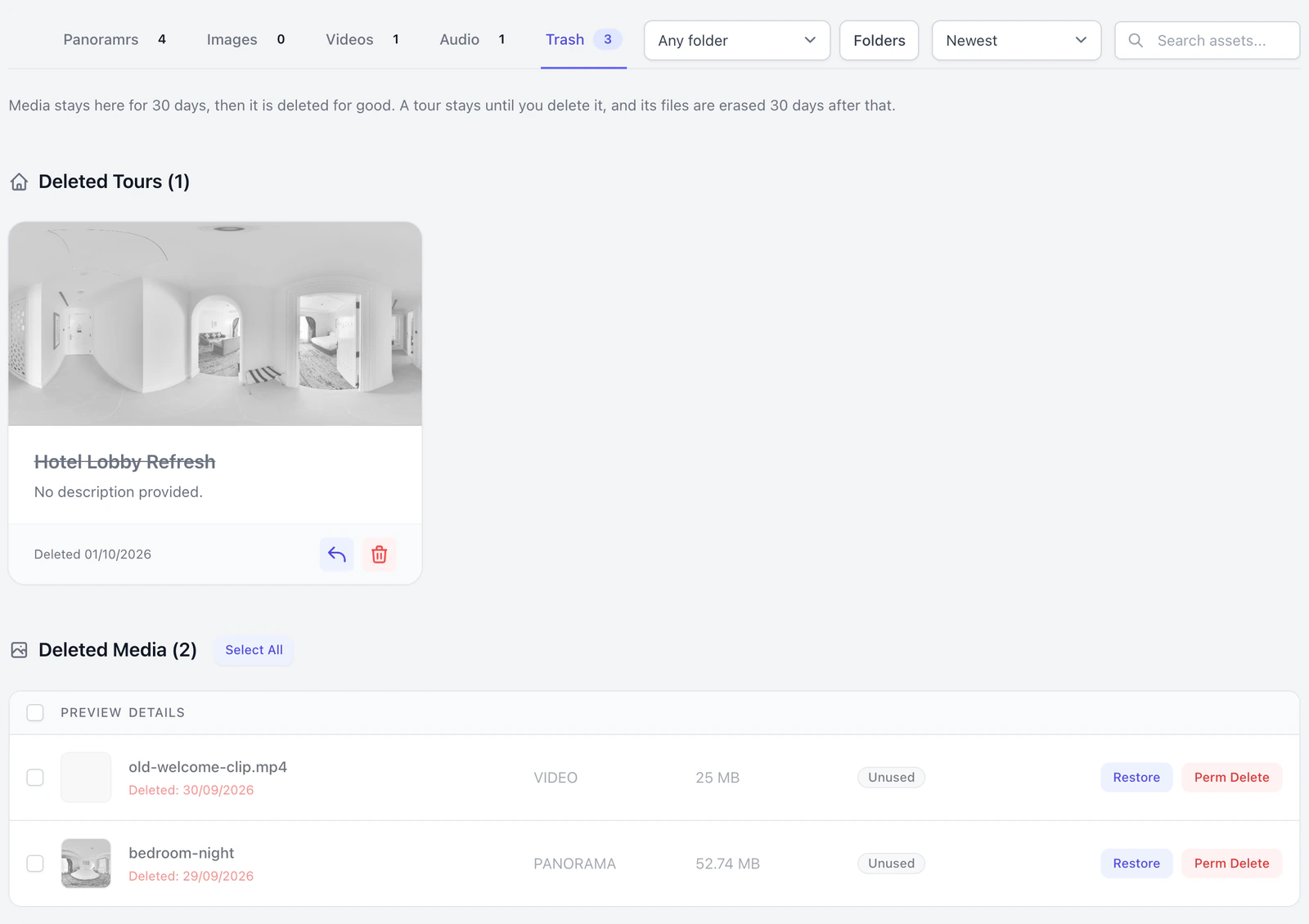
- Media after 30 days is deleted for good, with its files, by a daily job. A panorama goes even if tours still list it. A file that a tour still uses is kept in the Trash instead.
- A tour stays until you click Permanently Delete. It then leaves your account and is gone from the Trash. Its files (its Assets-tab files, floor plans, thumbnail and logo) are erased by a daily job once 30 days have passed since you clicked Permanently Delete. Its panoramas are not part of that: they stay in your library.
- A tour's Tour tab shows
Trash (Deleted Panoramas), and its Assets tab (in the Advanced view)Trash (Deleted Assets)(files and floor plans), only while they hold something.
Restore
- A tour. Open the Asset Library, click the Trash tab and click the restore icon on the tour's card. The card leaves the Trash and the tour returns to My Tours with its settings as they were. A banner says
Tour restored successfully.for a few seconds. Only the owner can do this. - A panorama, file or floor plan. In the Trash tab click Restore and confirm. On a tour, open its trash accordion and click the restore icon (tooltip
Restore).
A restored panorama comes back in every tour that still lists it. Restoring checks your plan again, for the panoramas of each of those tours and for your account (Plans and limits).
What cannot come back
- A tour after Permanently Delete; anything after Perm Delete; and a panorama, floor plan or unused file after 30 days in the Trash.
- A picture our team removed after a report:
Our team removed this picture, so it cannot be restored from the trash. If you think that was a mistake, ask for a second look from the email we sent you. - A scene's settings in a tour after Remove from Tour: its name and description there, group, initial view and image adjustments.
- The old picture after Replace Original File (replace or swap a panorama).
Troubleshooting
Permanently Delete on the Tour tab did not delete the panorama. On a tour it only takes the panorama off that tour's list (Panorama removed from the tour.). The panorama stays in the Trash tab of the Asset Library: restore it there, or click Perm Delete.
Restoring shows Storage Limit Reached, Vault Full or Hosting Limit Reached. Storage Limit Reached: your account holds as many panoramas as its plan allows, so permanently delete some or upgrade. Vault Full or Hosting Limit Reached: the tour's Vault or your plan's hosting has no room, so take a scene out of that tour or make the Vault bigger. On the Tour tab it appears in an Upgrade Required window.
I cannot find the panorama I deleted. After Remove from Tour it is in the Asset Library under Panoramrs (read the note above before you add it back). After Delete Panorama (Everywhere) it is in the Trash tab for 30 days.
There is no delete icon on a scene, or no Danger Zone. Your role does not allow it: ask the owner.
A message flashed by and I missed it. Banners stay for about three seconds, and below 768 pixels wide they read only Success! or Error!.
Next steps
Was this article helpful?